
Salesforce Release Management Best Practices (2026 Guide)
Salesforce release management best practices help organizations deploy updates safely while maintaining stable production environments.
Modern Salesforce ecosystems rarely consist of a single environment. Instead, organizations operate several environments, including development orgs, sandbox testing environments, staging environments, and production systems. In many enterprise or ISV scenarios, releases may also affect dozens or even hundreds of Salesforce orgs.
Because of this complexity, deploying changes requires more than simply moving metadata to production. Instead, teams must plan, coordinate, validate, and monitor releases carefully.
Without proper Salesforce release management practices, organizations often experience:
- configuration drift across environments
- automation conflicts after deployment
- integration disruptions
- unexpected production incidents
Therefore, effective release management strategies help teams deploy changes safely while maintaining predictable system behavior.
For example, coordinating releases across multiple environments is a critical part of modern Salesforce operations. Learn more in our guide on Salesforce Release Coordination Across Multiple Environments.
What Is Salesforce Release Management?
Salesforce release management is the process of planning, coordinating, deploying, and validating updates across Salesforce environments.
A typical Salesforce release lifecycle includes several stages:
- release planning
- development and testing
- deployment execution
- production validation
Each stage helps ensure that changes are introduced safely without disrupting business operations.
Salesforce itself recommends adopting structured DevOps practices to manage deployments and releases more efficiently. You can explore the official guidance on Salesforce DevOps practices here.
However, even with CI/CD automation, organizations must still manage operational factors such as environment synchronization, integration readiness, and automation behavior.
Why Salesforce Releases Often Fail
Even when deployments succeed technically, production issues may still occur after the release.
Several factors contribute to this problem.
First, environments often diverge over time. Administrators may change permissions, automation, or layouts in specific environments, which creates configuration inconsistencies.
Second, automation processes such as workflows, flows, and triggers may behave differently when new configurations interact with real production data.
Third, external integrations may reconnect or process data differently after deployment.
These risks are explored in detail in our article on Salesforce Release Management Challenges.
Understanding these challenges is the first step toward improving release management strategies.
Salesforce Release Management Best Practices
Organizations that successfully manage Salesforce releases follow a structured set of operational practices. These practices help teams reduce deployment risks, maintain environment consistency, and ensure stable production systems.
Because Salesforce environments often include complex automation, integrations, and configuration layers, even small changes can produce unexpected results if releases are not managed carefully.
Therefore, successful teams approach release management as an operational discipline rather than a simple deployment task. By following well-established best practices, organizations can improve release reliability and reduce operational incidents.
Below are some of the most important Salesforce release management best practices used by mature DevOps teams.
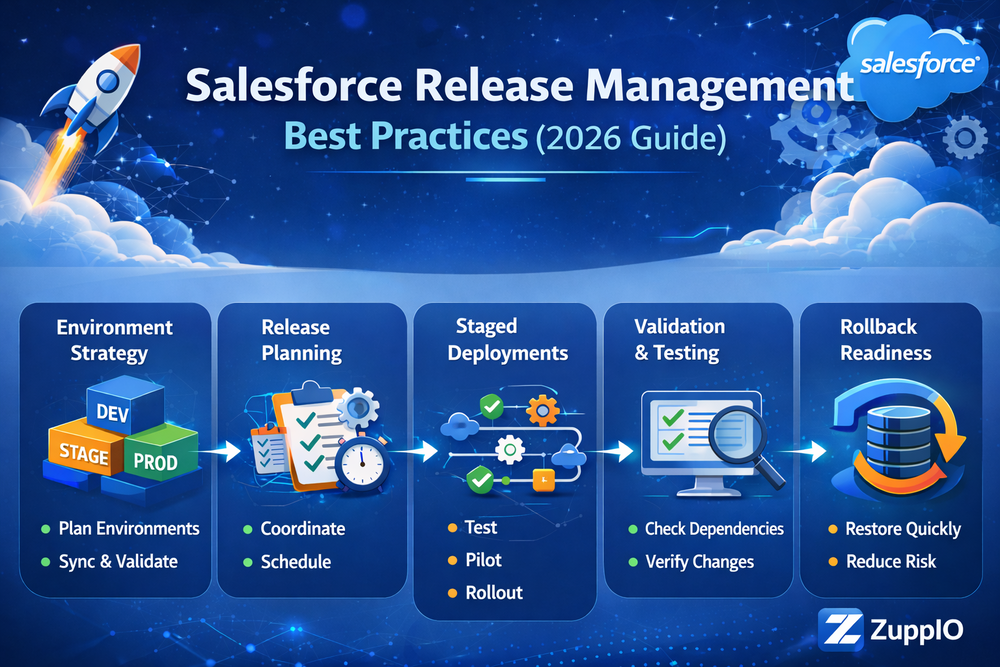
Environment Strategy
A structured environment strategy is the foundation of successful Salesforce release management.
Most organizations operate multiple environments that support different stages of the release lifecycle:
- development environments
- sandbox testing environments
- staging environments
- production environments
Each environment serves a specific purpose in validating changes before they reach production.
Salesforce provides detailed guidance on Salesforce sandbox environments in its official documentation.
By separating development, testing, and production environments, organizations reduce the risk of introducing unstable changes into production systems.
Release Planning and Coordination
Planning releases across environments ensures that deployments occur in a controlled and predictable way.
Teams must coordinate several activities before executing a release:
- metadata deployment scheduling
- integration readiness
- automation activation timing
- user access preparation
Proper coordination helps prevent inconsistent system behavior across environments.
For example, coordinating releases across environments is explained in detail in our guide on Salesforce Release Coordination Across Multiple Environments.
Staged Deployments
Instead of deploying changes everywhere at once, successful teams deploy updates gradually.
A staged rollout typically follows several phases:
1 sandbox validation
2 staging environment verification
3 limited production rollout
4 full production deployment
This gradual approach helps teams identify potential issues early.
You can learn more about rollout strategies in our article on Salesforce Release Rollout Strategy.
Staged deployments significantly reduce the risk of widespread production incidents.
Validation Before Activation
Before activating changes in production environments, teams should validate several aspects of the system.
Typical validation checks include:
- metadata dependencies
- configuration compatibility
- integration connectivity
- automation behavior
Validation helps ensure that the system behaves correctly once the release becomes active.
Tools such as Validation and Revert allow teams to verify deployments and restore previous states if needed.
Rollback Readiness
Even well-tested deployments may introduce unexpected issues.
For this reason, every release strategy should include rollback procedures.
Rollback readiness allows teams to restore the previous system state quickly if a deployment causes operational instability.
Having rollback procedures in place significantly improves release safety.
Managing Releases Across Multiple Salesforce Orgs
For organizations managing multiple Salesforce orgs, release management becomes even more complex.
Common scenarios include:
- enterprise multi-org architectures
- regional Salesforce deployments
- ISV subscriber environments
- large enterprise Salesforce ecosystems
In these cases, manually executing deployments across multiple orgs becomes inefficient and error-prone.
Automation tools such as Mass Package Install and Upgrade help manage deployments across many orgs simultaneously.
Similarly, tools such as Mass ZIP Deploys allow teams to deploy metadata across multiple environments.
Automation improves consistency and reduces operational risks.
Monitoring During Salesforce Releases
Monitoring plays a critical role during release execution.
During release phases, teams typically monitor several aspects of system behavior, including:
- system performance
- automation execution
- integration activity
- user interactions
Monitoring helps detect issues early and allows teams to pause or adjust rollout processes.
Salesforce provides architectural guidance for managing integrations and data flows in its Salesforce Data Integration Decision Guide.
By monitoring system behavior during releases, organizations can prevent small issues from escalating into large production incidents.
How ZuppIO Supports Salesforce Release Management
Managing releases across multiple environments requires automation and operational coordination.
ZuppIO helps organizations automate several operational tasks involved in Salesforce releases, including:
- mass package installations
- multi-org metadata deployments
- configuration synchronization
- validation across multiple environments
Additionally, teams can integrate ZuppIO with CI/CD pipelines to coordinate operational tasks during deployments.
Learn more about CI/CD integration with Salesforce releases.
By automating release operations, organizations can safely deploy Salesforce updates at scale.
Conclusion
Following Salesforce release management best practices helps organizations deploy updates safely across complex Salesforce ecosystems.
As Salesforce environments grow, deployment automation alone becomes insufficient. Instead, organizations must combine several operational practices:
- structured environment strategies
- coordinated release planning
- staged deployments
- validation and rollback readiness
- monitoring during releases
Together, these practices ensure stable Salesforce environments while allowing teams to deliver new functionality continuously.
What is Salesforce release management?
Salesforce release management is the process of planning, coordinating, deploying, and validating updates across Salesforce environments.
Why are Salesforce releases complex?
Salesforce releases are complex because environments often contain automation, integrations, and configuration differences that can affect system behavior after deployment.
What are Salesforce release management best practices?
Best practices include environment strategies, coordinated release planning, staged deployments, validation processes, and rollback readiness.
How do teams deploy Salesforce updates safely?
Organizations deploy updates safely by combining deployment automation, monitoring, environment synchronization, and structured release coordination.
How do organizations manage releases across multiple Salesforce orgs?
Organizations typically use deployment automation tools and coordinated release processes to deploy updates consistently across multiple Salesforce environments.