
Salesforce OAuth Changes: What Breaks After You Update Integrations
Salesforce OAuth changes are becoming more common as the platform introduces stricter security requirements. Many teams update their integrations to support features like PKCE and token rotation, expecting everything to work as intended.
However, in many cases, integrations stop working immediately after release — even though deployment was successful.
In practice, Salesforce OAuth changes can introduce issues that do not show up during deployment. These problems only become visible when integrations start running in production with real data, users, and live conditions.
Therefore, understanding what breaks after OAuth updates is critical for maintaining stable integrations.
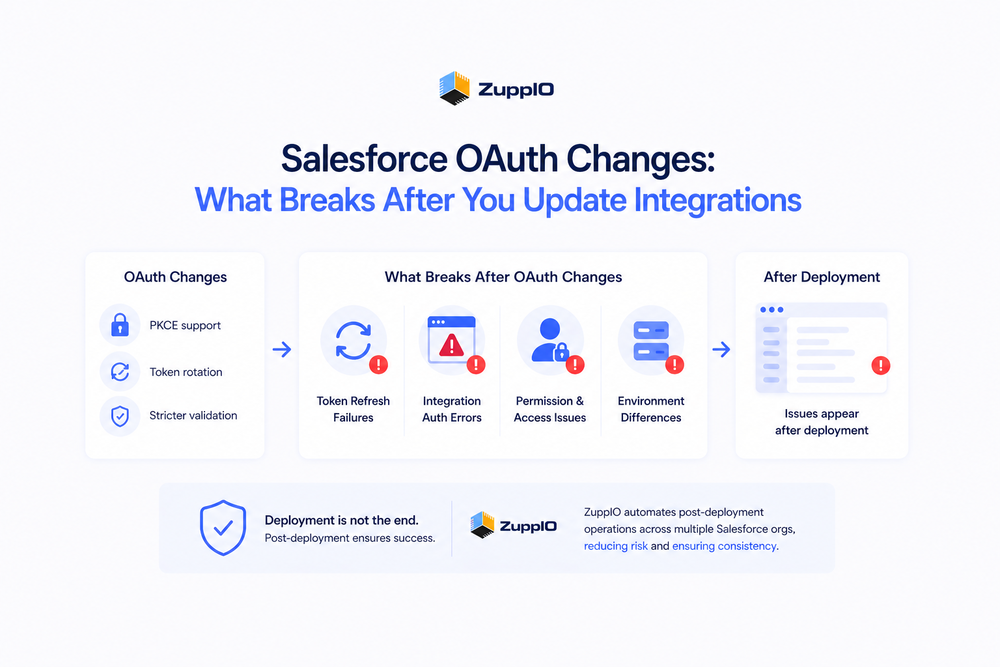
What Changed in Salesforce OAuth
Salesforce continues to strengthen its authentication model to improve security and reduce risk.
Recent changes include:
- Support for PKCE (Proof Key for Code Exchange)
- Refresh token rotation policies
- Stricter validation and lifecycle rules for tokens
- Updated behavior in Connected Apps
For example, Salesforce recommends using PKCE to secure OAuth flows, especially for public clients like mobile or SPA apps
Additionally, refresh token rotation improves security by invalidating previous tokens after each use, reducing the risk of token misuse
These changes improve security. However, they also introduce new operational complexity.
What Breaks After Salesforce OAuth Changes
After updating integrations, teams often encounter issues that were not visible during development or testing.
Token Refresh Failures
OAuth updates often change how tokens are issued and managed.
As a result:
- Refresh tokens may be invalidated due to rotation policies
- Integration logic may not correctly handle token renewal
- Existing sessions may stop working
These issues can interrupt integrations that previously worked reliably.
Integration Authentication Errors
Even small configuration mismatches can cause authentication failures.
For example:
- Incorrect redirect URIs
- Missing or incorrect PKCE implementation
- Misconfigured Connected Apps
These issues typically appear only in production environments.
Permission and Access Issues
OAuth changes do not directly modify permissions. However, they often expose existing gaps.
Teams may notice:
- Users losing access to data
- API calls returning authorization errors
- Features becoming unavailable
This happens because authentication changes surface misaligned access configurations.
Environment Differences
Salesforce environments are rarely identical.
Differences may include:
- Connected App configurations
- Callback URLs
- User roles and permissions
- Integration endpoints
As a result, an OAuth update that works in a sandbox may behave differently in production.
Why These Issues Don’t Appear During Deployment
Most OAuth-related problems are not deployment issues.
CI/CD pipelines ensure that metadata is deployed correctly. However, they do not validate runtime behavior.
This means:
- Authentication flows are not fully tested in real conditions
- Token behavior is not validated with live integrations
- External dependencies are not fully exercised
This explains why issues appear after deployment, not during it.
Post-Deployment Challenges After OAuth Changes
Once OAuth updates are applied, teams face several operational challenges.
These include:
- Verifying that integrations still work
- Identifying authentication failures quickly
- Ensuring consistent configurations across environments
- Fixing issues without downtime
In many cases, these tasks are handled manually. As a result, risk increases significantly.
OAuth Changes Become an Operational Problem at Scale
In a single org, OAuth changes can often be managed manually.
However, in multi-org environments, even small authentication changes quickly become complex:
- Configurations diverge across orgs
- Integrations behave differently
- Updates must be repeated manually
- Errors become harder to track
Therefore, OAuth changes stop being a technical task and become an operational challenge.
How Teams Handle OAuth Changes Today
Most teams rely on a combination of manual work and scripts.
Typical approaches include:
- Updating configurations one environment at a time
- Running manual validation checks
- Fixing issues reactively after failures occur
However, this approach does not scale well and introduces risk in larger environments.
How to Reduce Risk After OAuth Updates
To manage Salesforce OAuth changes effectively, teams need structured post-deployment processes.
Best practices include:
- Validating integrations immediately after deployment
- Monitoring authentication and API activity
- Checking permissions and access
- Ensuring consistency across environments
For a structured validation approach, see
To understand monitoring after release, see
Where ZuppIO Fits in the Process
ZuppIO works as an operational layer between deployment and a working system.
It does not replace OAuth configuration or CI/CD tools. Instead, it helps teams manage what happens after changes are applied.
For example, when OAuth changes impact integrations across multiple environments, teams can:
- Execute coordinated post-deployment operations across orgs
- Apply updates consistently at scale
- Validate and adjust configurations after release
- Reduce configuration drift between environments
This is especially important when changes must be applied consistently across multiple orgs.
As a result, teams can move from reactive fixes to controlled, repeatable post-deployment processes.
Conclusion
Salesforce OAuth changes improve security. However, they also introduce new complexity.
Many issues do not appear during deployment. Instead, they emerge after release, when integrations begin operating in real conditions.
At scale, these changes become an operational challenge rather than a technical one.
Therefore, managing OAuth updates requires more than configuration changes. It requires structured post-deployment processes and operational control.
Teams that address this gap can reduce failures, improve consistency, and ensure that integrations continue to work after updates.
What are Salesforce OAuth changes?
Salesforce OAuth changes refer to updates in authentication mechanisms, including PKCE support, token rotation, and stricter security requirements for connected apps.
Why do integrations break after OAuth updates?
Integrations may break due to token handling issues, configuration mismatches, or differences between environments that are not visible during deployment.
What is PKCE in Salesforce OAuth?
PKCE (Proof Key for Code Exchange) is a security mechanism that ensures the client that starts the OAuth flow is the same one that completes it, improving security
How can teams prevent OAuth-related issues?
Teams can reduce risk by validating integrations after deployment, monitoring authentication behavior, and ensuring consistent configurations across environments.
Do OAuth changes affect multiple orgs differently?
Yes, differences in configuration, users, and integrations can cause OAuth changes to behave differently across Salesforce orgs.