
Salesforce Release Process Explained (Step-by-Step)
The Salesforce release process includes multiple stages that go far beyond deployment.
Many teams focus on delivering changes quickly, but still face issues after release. Layouts break, permissions drift, and configurations remain inconsistent across environments.
The reason is simple: deployment is only one step in the release lifecycle. To build reliable systems, teams must understand the full workflow — from development to post-deployment.
What Is the Salesforce Release Process
The Salesforce release process is the complete lifecycle of delivering changes from development to production and ensuring they work correctly.
It includes not only deploying code and metadata, but also validating, updating configurations, and maintaining consistency across environments.
A well-defined process helps teams reduce errors, improve reliability, and scale across multiple orgs.
Release Lifecycle Overview
A typical release workflow consists of the following stages:
- Development
- Version Control
- Testing
- Deployment
- Post-Deployment
- Monitoring
Each stage plays a critical role in ensuring a successful release.
Step 1: Development
The process begins with development.
Teams build new features or make changes in sandbox or scratch org environments. These changes may include:
- Metadata updates
- Apex code
- UI configurations
This stage defines what will be delivered in the release.
Step 2: Version Control
Version control ensures that all changes are tracked and managed properly.
Most teams use Git-based workflows to:
- Track changes
- Collaborate across teams
- Maintain release history
This is essential for enabling automation and maintaining consistency.
Step 3: Testing
Before deployment, changes must be validated through testing.
This includes:
- Unit tests
- Integration testing
- User acceptance testing (UAT)
Salesforce enforces test coverage requirements for production deployments
Testing helps prevent issues before changes reach production.
Step 4: Deployment
Deployment is the process of moving changes to production or other environments.
This stage is typically automated using CI/CD pipelines.
Learn more about CI/CD workflows
Deployment ensures that changes are delivered, but it does not guarantee that everything is fully configured.
Step 5: Post-Deployment
Post-deployment is one of the most critical stages in the Salesforce release process.
After deployment, several elements may require additional updates:
- Page layouts
- Permissions
- Configurations
- Data and scripts
For a deeper explanation of this stage
This layer ensures that the system works correctly after changes are delivered.
Step 6: Monitoring and Validation
After release, teams must monitor system behavior and validate results.
This includes:
- Checking system performance
- Identifying issues
- Validating configurations
- Rolling back changes if needed
For rollback and validation strategies
Monitoring helps maintain stability after release.
Common Challenges in the Release Workflow
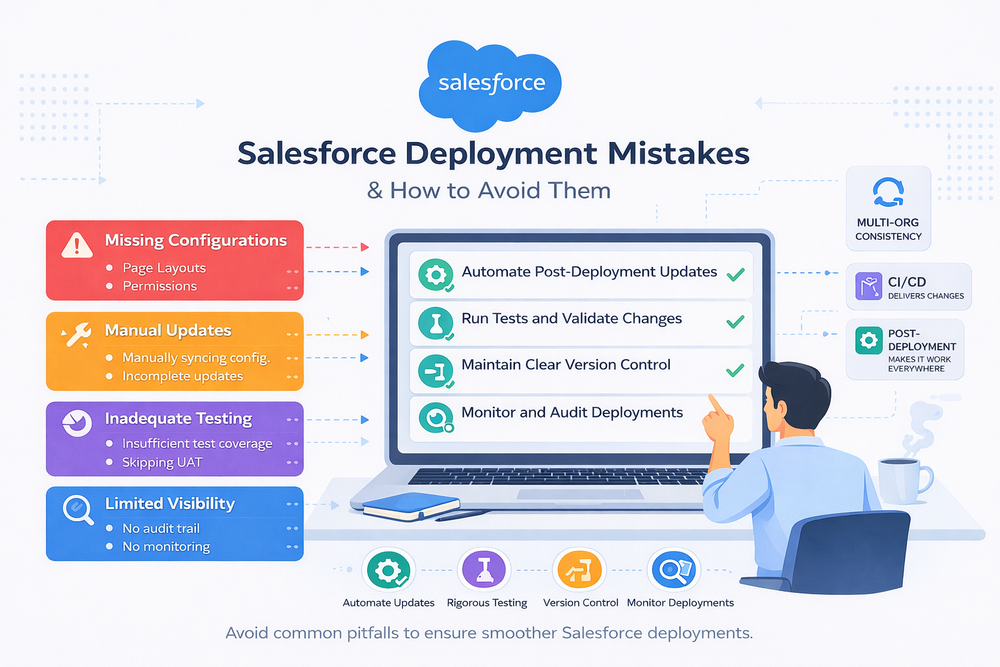
Even with structured processes, teams often encounter:
- Inconsistent environments
- Manual updates after deployment
- Missing configurations
- Limited visibility after release
These issues typically appear when post-deployment steps are not properly managed.
How the Process Changes at Scale
As environments grow, the release workflow becomes more complex.
- With one org, the process is manageable
- With multiple orgs, consistency becomes difficult
- At scale, manual processes slow everything down
Automation becomes essential to maintain reliability.
Tools Used in the Salesforce Release Process
Native Salesforce Tools
Salesforce provides Change Sets and Metadata API for deployments.
However, these tools are limited for complex release workflows.
CI/CD Solutions
CI/CD tools automate deployments and improve speed.
However, they do not fully address post-deployment coordination across environments.
Post-Deployment Automation Tools
Specialized tools focus on applying updates after deployment.
They help synchronize environments and reduce manual work.
How ZuppIO Supports the Workflow
ZuppIO helps extend the release workflow beyond deployment.
It allows teams to:
- Apply configuration updates across orgs
- Execute scripts at scale
- Maintain consistency after release
For example, bulk updates can be handled here
This reduces manual effort and improves reliability.
Conclusion
The Salesforce release process does not end with deployment.
While CI/CD ensures delivery, post-deployment ensures that systems work correctly across environments.
Teams that optimize the full lifecycle can reduce errors, improve consistency, and scale more effectively.
What is the Salesforce release process?
It is the full lifecycle of delivering changes from development to production and ensuring they work correctly after release.
What is the difference between deployment and release?
Deployment is the act of delivering changes, while the release includes all steps required to ensure those changes are functional.
Why do Salesforce releases fail?
Failures often occur due to missing configurations, inconsistent environments, or lack of post-deployment validation.
How can the Salesforce release process be improved?
By defining structured workflows, automating repetitive tasks, and ensuring consistency across environments, especially after deployment.